
Communication and Collaboration Software
WhatsApp Restricted Chat Keeps Conversations Off Linked Devices And Blocks Meta AI
Updated on Mon, Oct 5, 2026
Share
The feature is currently reaching some WhatsApp beta users on Android and iPhone, but there is no confirmed timeline for a wider release.
TL;DR
- WhatsApp Restricted Chat keeps selected conversations unavailable on WhatsApp Web, desktop apps and other linked devices.
- Restricted chats cannot be exported, cannot use Meta AI and will not automatically save shared media to a phone’s gallery.
- The setting currently works only for one-to-one chats and is rolling out gradually to beta users on Android and iPhone.
WhatsApp Restricted Chat Keeps Sensitive Conversations On Primary Phones
Restricted Chat is an upgraded version of WhatsApp’s existing Advanced Chat Privacy setting, giving the privacy control a clearer name while extending what happens after it is enabled.
According to the report, the key change is that a restricted conversation remains available only on each participant’s primary smartphone.
That means the chat will not appear on WhatsApp Web, the desktop application or other linked devices associated with the account.
The restriction applies to everyone participating in the conversation rather than only the user who activates it. WhatsApp also displays a message inside the chat indicating that Restricted Chat has been enabled.
WhatsApp messages and calls continue to be end-to-end encrypted regardless of whether Restricted Chat is switched on or off.
The change adds another privacy-focused control as WhatsApp continues changing how users access and manage conversations across devices. TechDogs recently covered how WhatsApp ended support for Android 5.0 and 5.1, another change affecting how users access the messaging platform.
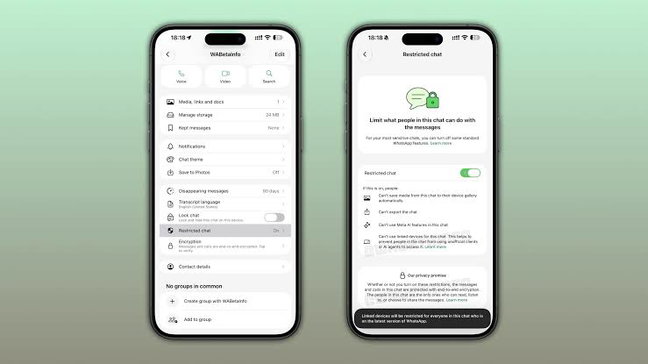
WhatsApp Restricted Chat Blocks Exports, Meta AI And Automatic Media Saving
Enabling Restricted Chat activates four limitations within the conversation.
Media sent through the restricted conversation will no longer be automatically saved to the phone’s gallery, while participants cannot export the conversation. Meta AI features are also unavailable inside the restricted chat, and the conversation cannot be opened from linked devices.
Blocking linked-device access could be particularly useful for people who remain signed in to WhatsApp on work laptops, shared computers or older devices they no longer regularly use.
The Meta AI restriction also separates these private conversations from WhatsApp’s AI functionality as Meta continues expanding artificial intelligence across its platforms. TechDogs has previously explored Meta AI's search and editing tools and how the company is embedding AI deeper into its products.
How To Enable WhatsApp Restricted Chat
Users who have received the feature can open the individual conversation they want to restrict and tap the contact’s name to access the chat information screen.
From there, they can scroll to Restricted Chat and switch the setting on. The feature is optional and remains disabled by default.
For now, Restricted Chat works only with individual conversations and does not support WhatsApp group chats.
Topics For More Insights
When Will WhatsApp Restricted Chat Reach All Users?
WhatsApp has not announced when Restricted Chat will become available to everyone.
The feature is currently being distributed gradually through WhatsApp’s beta programs on Android and iPhone, meaning installing the latest beta version does not guarantee immediate access. Its functionality could also change before a broader rollout.
Users who do not yet have Restricted Chat can still review devices connected to their account through WhatsApp’s Linked Devices section and sign out of computers or other devices they no longer recognize or use.
For users dealing with conversations they would rather keep confined to one device, Restricted Chat adds a more targeted privacy option without changing WhatsApp’s underlying end-to-end encryption.
First published on Mon, Oct 5, 2026

Liked what you read? That’s only the tip of the tech iceberg!
Explore our vast collection of tech articles including introductory guides, product reviews, trends and more, stay up to date with the latest news, relish thought-provoking interviews and the hottest AI blogs, and tickle your funny bone with hilarious tech memes!
Plus, get access to branded insights from industry-leading global brands through informative white papers, engaging case studies, in-depth reports, enlightening videos and exciting events and webinars.
Dive into TechDogs' treasure trove today and Know Your World of technology like never before!
Disclaimer - Reference to any specific product, software or entity does not constitute an endorsement or recommendation by TechDogs nor should any data or content published be relied upon. The views expressed by TechDogs' members and guests are their own and their appearance on our site does not imply an endorsement of them or any entity they represent. Views and opinions expressed by TechDogs' Authors are those of the Authors and do not necessarily reflect the view of TechDogs or any of its officials. While we aim to provide valuable and helpful information, some content on TechDogs' site may not have been thoroughly reviewed for every detail or aspect. We encourage users to verify any information independently where necessary.
Loading comments...